Dow Theory Swing Trade Type EA Selene] Won a prize at the FXGT trading competition!


I wrote a brief comparison article about five years ago, but now that MT5 has been repeatedly upgraded and the functional differences are even greater, I would like to reorganise the information.
MT4 has been the mainstay of the trading platform market for many years since its release in 2005 and boasts strong popularity, but it is now recommended to use MT5.
On the other hand, many users continue to use MT4 due to the problem that assets (EAs, indicators) developed with MT4 cannot be easily transferred to MT5, but the disadvantages of continuing to use MT4 are growing larger by the day.
In this article, I would like to summarise information about the disadvantages of continuing to use MT4 and the advantages of using MT5 by reviewing the differences between MT5 and MT4 functions based on the latest information.
The basic premise before comparing products is to understand that MT4 is not recommended for new users now, as the product is already in its decline phase.

Renat Fatkhullin, CEO of MetaQuotes, the developer of MetaTrader, mentioned within the MQL5.com community that MT4 licences are not already sold to brokers.
Just to be sure, though, I also made enquiries to the Business Development team at HFM, a brokerage firm that also offers the MT4 platform,
The answer to this question was to the effect that. There is no doubt that MT4 licences are no longer being sold to brokerage firms.
It does not mean that individual investors will not be able to use MT4 with their current brokerage firms right now, but it is certain that the use of MT4 is unlikely to expand in the future.
Going back through the MT4 release notes, it can be seen that some functional improvements were made up until around 2015, but since then the frequency of updates has decreased and only releases that seem to be security updates or bug fixes have been made.
On the other hand, the release notes for MT5 show that major functional additions and improvements are repeated approximately every three months.
MT4 has not added any functionality for nearly a decade, and the gap between MT5 and MT4 has widened significantly over time.
In the above statement by Renat Fatkhullin, a specific date and possibility of EOL for MT4 was also mentioned.
Although there was a statement to the effect that support would cease in 2023, no announcement of the end of support seems to have been made at this point, but MT4 EOL is considered inevitable sooner or later.
When a product is no longer supported, compatibility with the latest version of WindowOS will no longer be guaranteed and maintenance such as security measures will no longer be carried out, making it difficult to use MT4 in a stable manner.
MT4 users should be aware of this fact and seriously consider whether to continue using MT4 with an understanding of the risks or prepare for the transition as soon as possible.
For these reasons, it is strongly recommended to choose MetaTrader 5 (MT5) when starting out with a new trading platform.
MT5 is already superior to MT4 in many ways; choosing MT5 is the best option.
The following is a list of specific differences in functionality. The information on the basis of the differences is mainly based on the official documentation and release notes.
Detailed comparisons of each statement are explained in detail in the next chapter or so. As the chapters are very long, please refer only to the necessary sections, e.g. by jumping from the table of contents.
https://www.metatrader5.com/en/trading-platform/comparison-mt5-mt4
https://www.metatrader5.com/ja/releasenotes
| Category | Item | MT5 | MT4 |
|---|---|---|---|
| Trading Environments | Supported markets. | Foreign exchange , futures, options, equities, bonds | Foreign exchange (, futures, options, equities, bonds) |
| Time frame | 21 Type. | 9 Type. | |
| Ordering system | Partial settlement | Available | Impossible |
| Fill Policy | FOK | IOC | Return | FOK | |
| Type of pending order | 6 Type. | 4 Type. | |
| Function | Using the economic indicators calendar | Available | Impossible |
| Type of chart object | 44 | 31 | |
| Technical Indicators | 109 | 51 | |
| Python integration | Available | Impossible | |
| Backtest | Architecture | Multithread | Single thread |
| Multi-currency trading | Available | Impossible | |
| Data Model | Realtic available | No realtick | |
| Multi-process support | Support | Unsupported | |
| Distributed processing on multiple PCs | Support | Unsupported | |
| Cloud resource utilisation | Support | Unsupported | |
| Historical data | Brokerage data (by account type) | MetaQuotes company rates | |
| Spread | RealData | Fixed Value |
| Category | Item | MQL5 | MQL4 |
|---|---|---|---|
| Language specifications | Object Oriented Programming | Support | Partially supported |
| Function | Data Base Access | SQLite3 support | Unsupported |
| Python integration | MT5 can be operated from python using the python library. | Unsupported | |
| Machine learning model incorporation | Supports ONNX format | Unsupported | |
| OpenCL support | Support | Unsupported | |
| Reuse of indicator values | Data can be referenced using indicator handles. | Unsupported | |
| Event handling | 14 Type. | 8 Type. |
The official MetaQuotes comparison chart seems to state that ‘MT5 supports exchange, futures, options, stocks and bonds, while MT4 only supports exchange’, but an actual comparison of stocks and bonds at the same brokerage firm revealed that in some cases, MT4 also delivers rates for stocks and bonds in a tradable state.
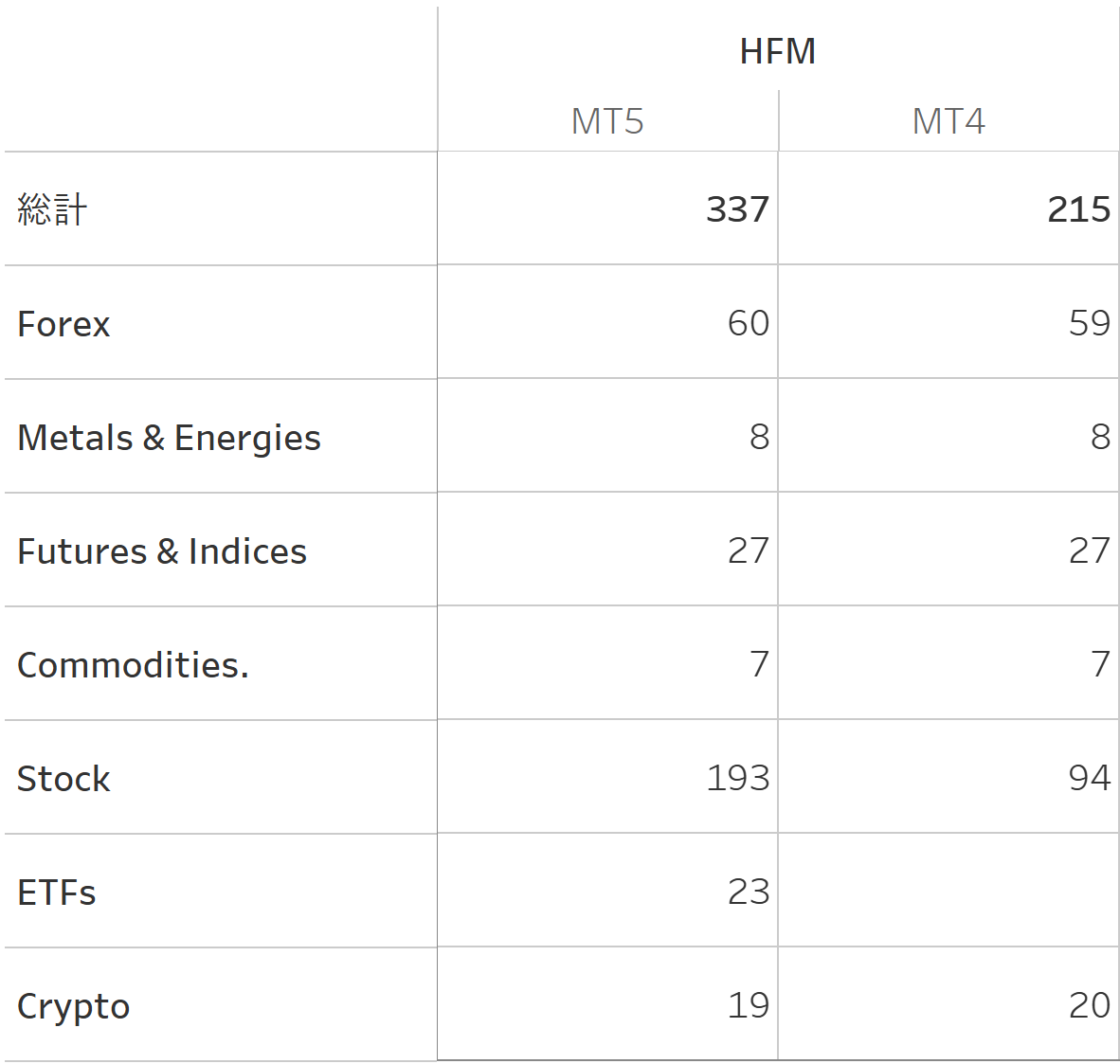
As an example, we compared the difference in stocks offered by MT5 (Premium account) and MT4 (Premium account) at brokerage firm HFM.
| Category | HFM(Premium) MT5 | HFM(Premium) MT4 |
|---|---|---|
| Forex | 60 | 59 |
| Metals & Energies | 8 | 8 |
| Futures & Indices | 27 | 27 |
| Commodities | 7 | 7 |
| Stock | 193 | 94 |
| ETFs | 23 | 0 |
| Crypto | 19 | 20 |
| Total | 337 | 215 |
The total number of stocks is 337 for MT5 and 215 for MT4, indicating that MT5 has more stocks.
While there is little difference in the currency stocks (Forex) that FX traders usually look at, MT5 has a richer choice, especially in individual stock stocks (Stocks) and ETFs (ETFs).
One of the main attractions of MT5 and MT4 is the ability to run automated trading tools, but it is very attractive that automated trading can be performed for stock indices, individual stocks, sector-specific ETFs, commodities, etc., which greatly expands trading options.
For those who normally only look at FX stocks, it would be interesting to scan a wide range of stocks to see if there are any that work with your logic, as you have the opportunity to trade on so many different stocks.
Next, we look at whether there are differences in stocks between brokerages in MT5 as well. A comparison was made between HFM (Premium account) and XM (Standard account).
| Category | HFM(Premium) MT5 | XM(Standard) MT5 |
|---|---|---|
| Forex | 60 | 57 |
| Metals & Energies | 8 | 0 |
| Futures & Indices | 27 | 41 |
| Commodities | 7 | 0 |
| Stock | 193 | 0 |
| ETFs | 23 | 0 |
| Crypto | 19 | 31 |
| Total | 337 | 129 |
XM has a difference of 200 issues compared to HFM, indicating that the number of issues is considerably smaller.
The groups to which the stocks belong are managed under each company's own name and are not unified, so the names were collated individually, so they may have been classified in unintended places, but it is clear that the numbers are very different.
In particular, the lack of individual stock and ETF offerings makes a big difference, so investors already using XM may find new trading opportunities by using or switching between several brokerage firms in parallel.
| time frame | time frame(programmatic notation) | MT5 | MT4 |
|---|---|---|---|
| 1 min | PERIOD_M1 | ||
| 2 min | PERIOD_M2 | ||
| 3 min | PERIOD_M3 | ||
| 4 min | PERIOD_M4 | ||
| 5 min | PERIOD_M5 | ||
| 6 min | PERIOD_M6 | ||
| 10 min | PERIOD_M10 | ||
| 12 min | PERIOD_M12 | ||
| 15 min | PERIOD_M15 | ||
| 20 min | PERIOD_M20 | ||
| 30 min | PERIOD_M30 | ||
| 1 hr. | PERIOD_H1 | ||
| 2 hr. | PERIOD_H2 | ||
| 3 hr. | PERIOD_H3 | ||
| 4 hr. | PERIOD_H4 | ||
| 6 hr. | PERIOD_H6 | ||
| 8 hr. | PERIOD_H8 | ||
| 12 hr. | PERIOD_H12 | ||
| 1 day | PERIOD_D1 | ||
| 1 week | PERIOD_W1 | ||
| 1 month | PERIOD_MN1 |
MT5 supports more timeframes than MT4, with MT5 having 21 and MT4 having 9. This allows traders more detailed and flexible market analysis.
MT5 supports partial settlement. This is a feature that allows traders to close part of their position at a specific price and keep the rest of the position. Partial settlement is very useful as a flexible tool for risk management and profit taking.
For example, when a position reaches its target price, a trader can close a portion of the position to lock in profits and aim for further price increases with the remaining position. This allows traders to adjust their strategies according to market trends while still securing profits.
The fill policy defines the method by which the firm will deal with the case where not all the orders are passed in the event of low market liquidity or in the event of high speed and high volume trading.
To the extent that FX issues are traded in general lot sizes, this is something that is not something you are very aware of, but it is relevant to some users, as it needs to be clearly stated when orders are not passed in the above cases or when trading from an automated trading tool.
| Fill Policy | Description. | MT5 | MT4 |
|---|---|---|---|
| FOK(Fill or Kill) | Either the order is executed immediately and fully in the specified quantity or it is not executed at all. Partial execution is not permitted. | ||
| ICO(Immediate or Cancel) | The order is executed immediately in as many quantities as possible and the remaining quantities are cancelled. Partial execution is possible. | ||
| Return | The order is executed immediately in as many quantities as possible and the order continues for the remaining quantities. |
MT5 is more likely to support multiple fill policies.
We now know that there are differences between platforms, but in practice, users are not free to specify which one they want to use, but rather a fixed one set by each brokerage firm.
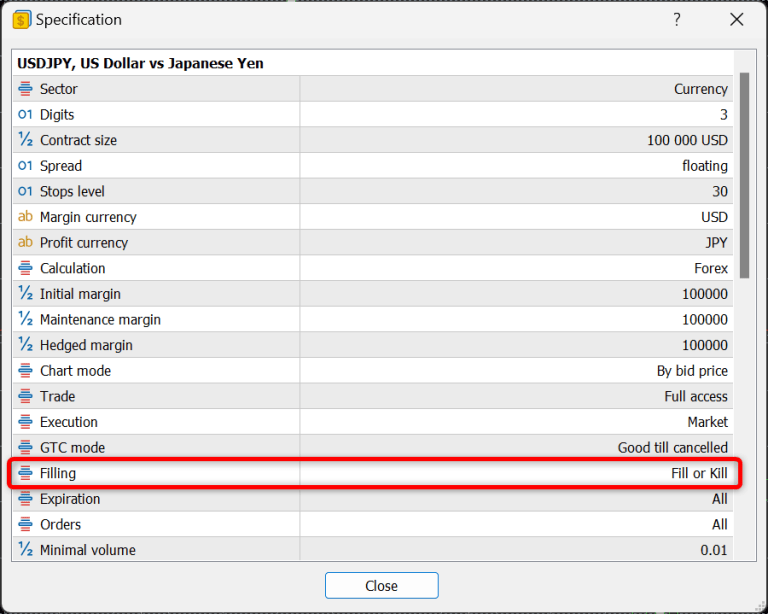
You can check this yourself by checking the ‘specification’ of each issue, which describes it. It appears that FOK is used for HFM and IOC for XM.
| HFM | XM |
|---|---|
 |  |
The table below compares the types of pending orders supported by MT4 and MT5 and their descriptions.
| Type of pending order | Description. | MT5 | MT4 |
|---|---|---|---|
| Buy Limit | Set a buy order at a price lower than the current market price. The order is executed if the price falls to the specified price. | ||
| Sell Limit | Set up a sell order at a price higher than the current market price. The order is executed if the price rises to the specified price. | ||
| Buy Stop | Set up a buy order at a price higher than the current market price. The order is executed if the price rises to the specified price. | ||
| Sell Stop | Set a sell order at a price lower than the current market price. The order is executed if the price falls to the specified price. | ||
| Buy Stop Limit | This order method combines Buy Stop and Buy Limit. When the price rises to the Buy Stop, the pre-specified buy limit order is activated. | ||
| Sell Stop Limit | This order type is a combination of Sell Stop and Sell Limit. When the price falls to the Sell Stop, the pre-specified sell limit order is activated. |
MT5 allows the use of stop limit orders as standard.
The diagram below shows the correspondence between the trading image of each pending order and the actual input fields on the order screen.
| Buy Limit | 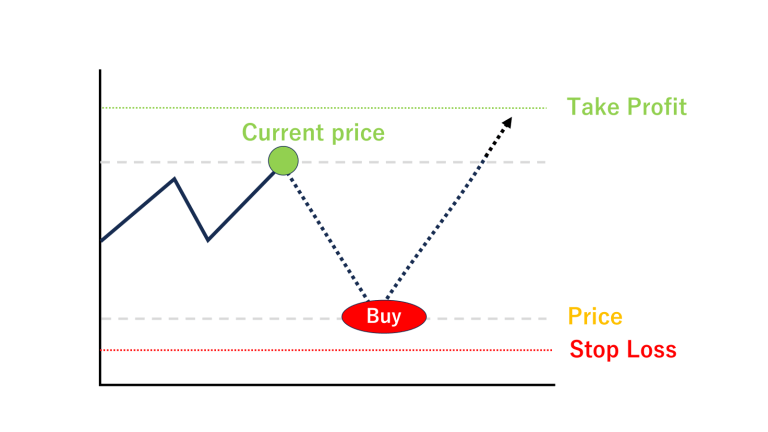 | 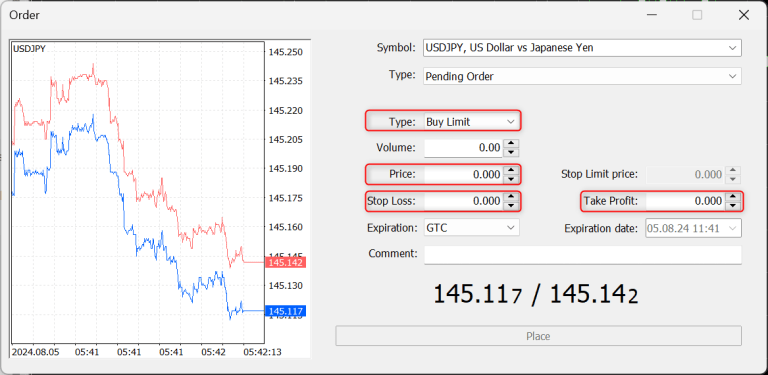 |
| Sell Limit | 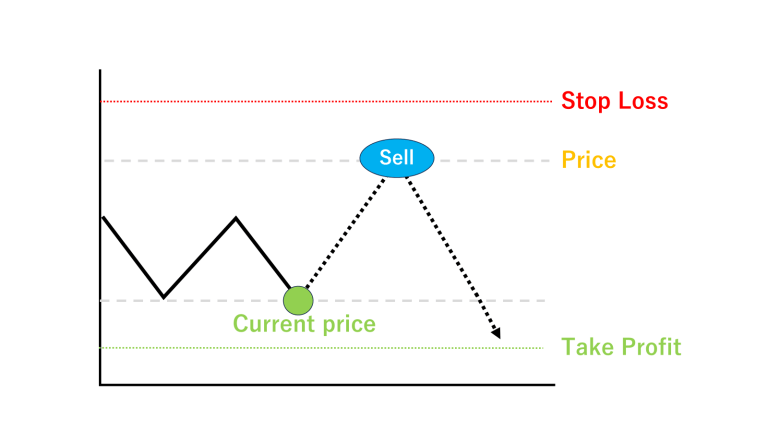 |  |
| Buy Stop |  | 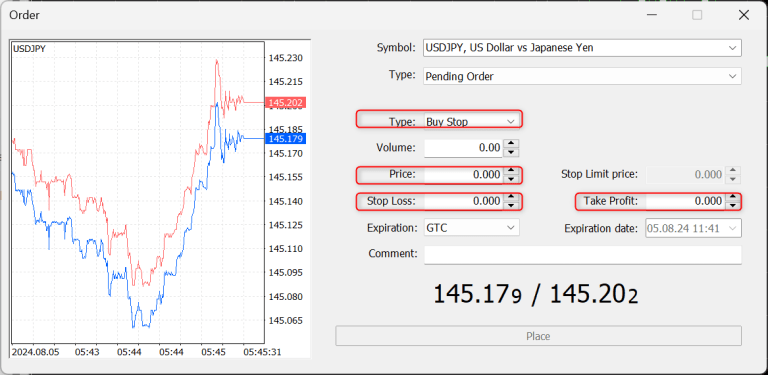 |
| Sell Stop | 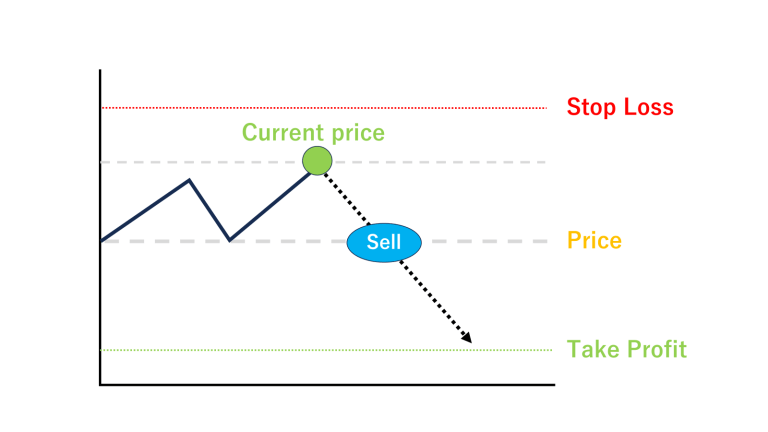 | 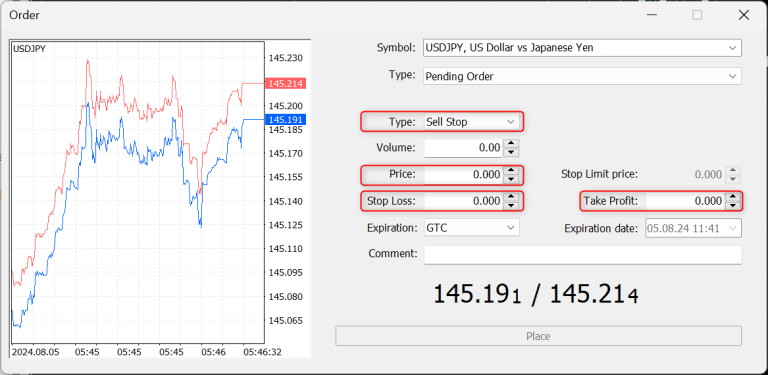 |
| Buy Stop Limit | 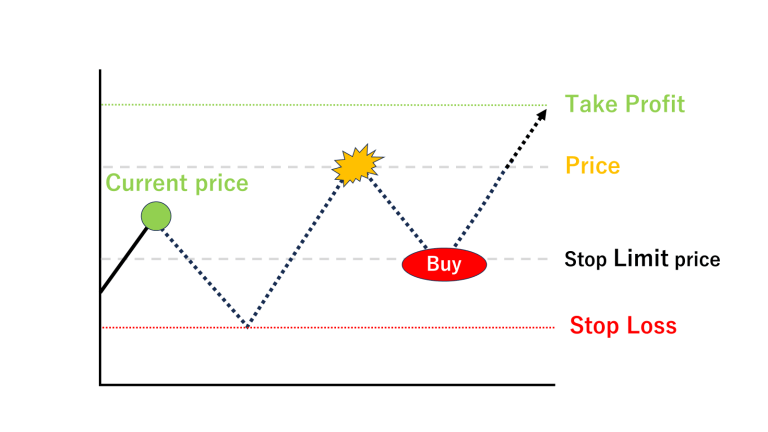 | 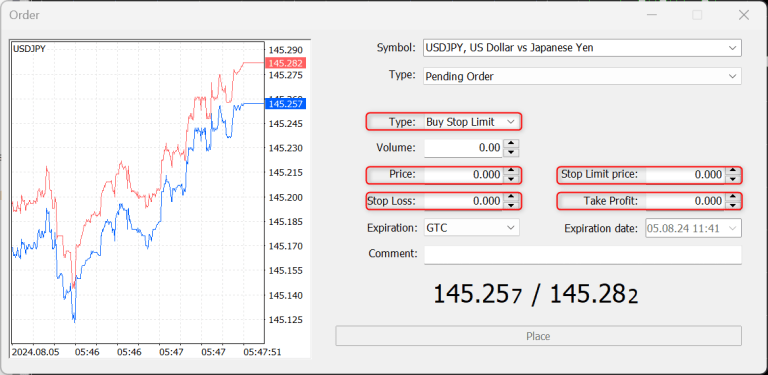 |
| Sell Stop Limit | 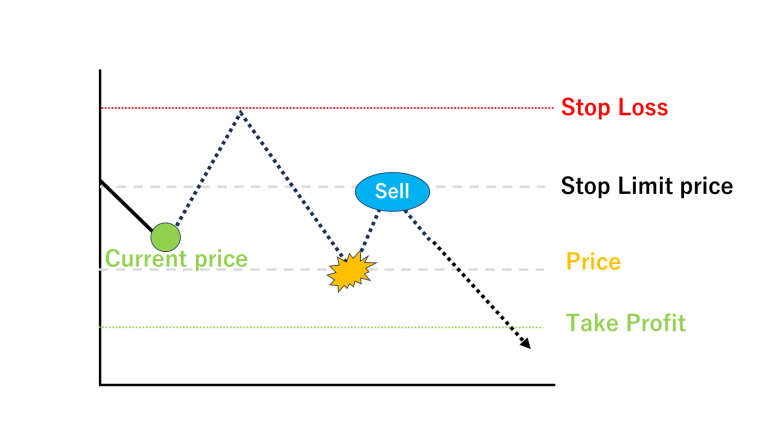 |  |
MT5 integrates economic indicator calendar data as a standard feature. This is a powerful tool for traders to track important economic events and indicator announcements and reflect them in their trading decisions.
This functionality is also accessible to data from the EA, so you can retrieve the time of the day's indicator announcement, the name of the event and its importance and use it in your trading (e.g. forego entry before the indicator).
As the market is expected to be volatile before and after the announcement of important indicators, it is essential to utilise the information from the economic indicator calendar and to work on your trades, even if they are automated.
It is such a big function that it can be said that there is a merit to use MT5 just to use this function.
In addition, although it is possible to obtain forecast values and results of the announcement of indicators, the results of economic indicators seem to be a system that automatically collects data from the web pages published by each country, and it does not seem to be possible to obtain such data promptly without a delay of a few tenths of a second after the announcement of an indicator.
Since a certain amount of delay also occurs, it is difficult to realise trades based on the announced values of economic indicators.
※Trading immediately after the announcement of an event (especially trading at high leverage or in large lots) may be restricted by the terms and conditions of the brokerage firm, so if you do decide to trade, make sure to check thoroughly before you do so.
The table below categorises and compares the technical indicators provided as standard in MT4 and MT5.
| Category. | Indicators. | MT5 | MT4 |
|---|---|---|---|
| Trend | Adaptive Moving Average | ||
| Average Directional Movement Index | |||
| Average Directional Movement Index Wilder | |||
| Bollinger Bands | |||
| Double Exponential Moving Average | |||
| Envelopes | |||
| Fractal Adaptive Moving Average | |||
| Ichimoku Kinko Hyo | |||
| Moving Average | |||
| Parabolic SAR | |||
| Standard Deviation | |||
| Triple Exponential Moving Average | |||
| Variable Index Dynamic Average | |||
| Oscillators | Average True Range | ||
| Bears Power | |||
| Bulls Power | |||
| Chaikin Oscillator | |||
| Commodity Channel Index | |||
| DeMarker | |||
| Force Index | |||
| MACD | |||
| Momentum | |||
| Moving Average of Oscillator | |||
| Relative Strength Index | |||
| Relative Vigor Index | |||
| Stochastic Oscillator | |||
| Triple Exponential Average | |||
| Williams' Percent Range | |||
| Volumes | Accumulation/Distribution | ||
| Money Flow Index | |||
| On Balance Volume | |||
| Volumes | |||
| Bill Williams | Accelerator Oscillator | ||
| Alligator | |||
| Awesome Oscillator | |||
| Fractals | |||
| Gator Oscillator | |||
| Market Facilitation Index | |||
| Examples | FlameChart | ||
| ChartPanel | |||
| SimplePanel | |||
| Accelerator | |||
| AD | |||
| ADX | |||
| ADXW | |||
| Alligator | |||
| AMA | |||
| ASI | |||
| ATR | |||
| Awesome | |||
| BB | |||
| Bears | |||
| Bulls | |||
| BW‐ZoneTrade | |||
| CCI | |||
| CHO | |||
| CHV | |||
| ColorBars | |||
| ColorCandlesDaily | |||
| ColorLine | |||
| Custom Moving Average | |||
| DEMA | |||
| DeMarker | |||
| DPO | |||
| Envelopes | |||
| Force_Index | |||
| Fractals | |||
| FrAMA | |||
| Gator | |||
| Gator_2 | |||
| Heiken_Ashi | |||
| Ichimoku | |||
| iExposure | |||
| MACD | |||
| MarketFacilitationIndex | |||
| MFI | |||
| MI | |||
| Momentum | |||
| OBV | |||
| OsMA | |||
| ParabolicSAR | |||
| Price_Channel | |||
| PVT | |||
| ROC | |||
| RSI | |||
| RVI | |||
| StdDev | |||
| Stochastic | |||
| TEMA | |||
| TRIX | |||
| Ultimate_Oscillator | |||
| VIDYA | |||
| Volumes | |||
| VROC | |||
| WPR | |||
| W_AD | |||
| ZigZag | |||
| ZigZagColor | |||
| Free Indicators | Camarilla Channel | ||
| DeMark Channel | |||
| Donchian Channel | |||
| Fibonacci Channel | |||
| Keltner Channel | |||
| MarketProfile Canvas | |||
| MarketProfile | |||
| MurreyMath Channel | |||
| NRTR Channel | |||
| Parabolic Channel | |||
| Pivot Channel |
We found that MT5 has 109 indicators and MT4 has 51 indicators placed as standard features. The official comparison page states that MT5 has 38 indicators and MT4 has 30, but we simply counted all the indicators displayed in the tree, and the results are as shown on the left.
Some of the indicators under the Example group of MT5 indicators seem to overlap with those under other groups (the Example group not only provides the indicators themselves, but also sample source code, so it seems that the same indicators exist).
Even subtracting this duplication, MT5 has a very large number of indicators that can be used immediately.
The indicators that are available as standard features are considered to be the ones that market participants use most often (i.e. those that are often seen and function well as a result), so it is recommended that you focus on using this range of indicators first.
If you have requirements that cannot be met by the standard functions, you can functionalise your own rules by using custom indicators for both MT5 and MT4.
When creating custom indicators, MT5 is by far the better choice. This is due to the difference between the programming language used in MT5 (MQL5) and the programming language used in MT4 (MQL4), but there are also significant functional differences between the languages, which are discussed below.
The table below compares the types of chart objects available in MT4 and MT5.
| Type of chart object | Description. | MT5 | MT4 |
| Vertical Line | Vertical line indicating a specific time on the chart. | ||
|---|---|---|---|
| Horizontal Line | Horizontal lines indicating specific price levels on the chart. | ||
| Trendline | Diagonal lines to indicate trend direction. | ||
| Trend by Angle | Trendlines with a constant angle, indicating the angle of price fluctuation. | ||
| Cycle Lines | Vertical lines to indicate market movements that repeat themselves at regular intervals. | ||
| Allowed Line | Lines with arrows to indicate direction or specific movement. | ||
| Equidistant Channel | Channel consisting of two parallel trend lines. | ||
| StdDev Channel | Channels based on moving averages and standard deviation of prices. | ||
| Regression Channel | Channel based on regression analysis. | ||
| Andrews Pitchfork | Trend channels drawn on the basis of three points. | ||
| Gann Line | Showing the relationship between price and time based on the Gann theory. | ||
| Gann Fan | Indicates price support and resistance levels. | ||
| Gann Grid | Visualising the balance between price and time. | ||
| Fibonacci Retracement | Fibonacci retracements to indicate price reversal points. | ||
| Fibonacci Time Zones | Indicates Fibonacci levels based on the passage of time. | ||
| Fibonacci Fan | Indicates price support and resistance levels. | ||
| Fibonacci Arcs | To identify potential support and resistance levels based on the Fibonacci sequence. | ||
| Fibonacci Channel | Channel based on Fibonacci ratios. | ||
| Fibonacci Expansion | To predict potential support and resistance levels beyond the price trend. | ||
| Elliott Motive Wave | Indicates that prices move in five waves along the main trend. | ||
| Elliott Corrective Wave | Indicates that prices move in three waves when correcting against the main trend. | ||
| Rectangle | Rectangles used to enclose specific price ranges. | ||
| Triangle | Triangles used to indicate price convergence or diffusion. | ||
| Ellipse | Ellipses used to highlight specific price ranges or areas of interest. | ||
| Thumbs Up | Icons used to highlight specific points, generally indicating positive signals. | ||
| Thumbs Down | Icons used to highlight specific points, generally indicating negative signals. | ||
| Arrow Up | Arrows used to indicate price increases. | ||
| Arrow Down | Arrows used to indicate falling prices. | ||
| Stop Sign | Icons indicating the point at which certain actions need to be stopped. | ||
| Check Sign | Icons used to identify specific points. | ||
| Left Price Label | Labels to display price information on the left-hand side of the chart. | ||
| Right Price Label | Labels to display price information on the right-hand side of the chart. | ||
| Buy Sign | Icon indicating a buy signal on the chart. | ||
| Sell Sign | Icon indicating a sell signal on the chart. | ||
| Arrow | Basic icons to indicate specific directions or points on the chart. | ||
| Text | Add any text on the chart. | ||
| Label | Text object for labelling specific points. | ||
| Button | Object to add interactive buttons on the chart. | ||
| Chart | Graphical display objects used for data visualisation. | ||
| Bitmap | Objects displaying images on a chart. | ||
| Bitmap Lavel | A label combining an image and text, fixed at a specific point on the chart. | ||
| Edit | Objects for adding text input fields on charts. | ||
| Event | Objects for triggering specific events. | ||
| Rectangle Label | Text labels with rectangular background. |
MT5 has 44 different objects available, while MT4 has 31.
These differences in functionality mean that there is a wider range of objects available when creating custom indicators as well as when setting up charts manually.
MT5 is significantly better for developing more graphical and manipulable indicators.
MT5 can be integrated with the general-purpose programming language Python, which is widely used in the fields of data science and machine learning, and its powerful libraries and tools can be used to create and integrate functions that would be difficult to develop in MT5 alone. This allows for a significant expansion of functionality.
Below is a list of functions for automatically performing MT5 operations from python using the MetaTrader package for Python.
https://www.mql5.com/ja/docs/python_metatrader5
| Function | Action. |
|---|---|
| initialize | Establish a connection with the MetaTrader 5 terminal. |
| login | Connects to a trading account using specified parameters. |
| shutdown | Closes previously established connections to the MetaTrader 5 terminal. |
| version | Returns the MetaTrader 5 terminal version. |
| last_error | Returns data on the last error that occurred. |
| account_info | Get information on current accounts. |
| terminal_info | Get the status and parameters of the connected MetaTrader 5 terminal. |
| symbols_total | Get the number of all financial instruments in the MetaTrader 5 terminal. |
| symbols_get | Get all financial instruments in the MetaTrader 5 terminal. |
| symbol_info | Retrieve data on the specified financial instrument. |
| symbol_info_tick | Get the last tick of the specified financial instrument. |
| symbol_select | Select stocks in the quote display window or delete stocks from the window. |
| market_book_add | Subscribe to market depth change events for specified stocks. |
| market_book_get | Returns a tuple from BookInfo featuring the MarketDepth entry for a given issue. |
| market_book_release | Cancel subscription to the board information change event for the specified issue. |
| copy_rates_from | Retrieve bars from the MetaTrader 5 terminal after the specified date. |
| copy_rates_from_pos | Retrieves bars after the specified index from the MetaTrader 5 Terminal. |
| copy_rates_range | Retrieve bars from the MetaTrader 5 terminal for the specified period. |
| copy_ticks_from | Retrieve ticks from the MetaTrader 5 terminal after the specified date |
| copy_ticks_range | Retrieve ticks from the MetaTrader 5 terminal for a specified period. |
| orders_total | Get the number of active orders. |
| orders_get | Retrieve active orders (with the ability to filter by issue or ticket). |
| order_calc_margin | Returns the margin for the execution of the specified trading operation in the account currency. |
| order_calc_profit | Returns the profits of a given trading operation in the account currency. |
| order_check | Ensure that there are sufficient funds to carry out the required trading operations. |
| order_send | Sends a request to perform a trading operation. |
| positions_total | Get the number of positions |
| positions_get | Retrieve positions (with the ability to filter by issue or ticket). |
| history_orders_total | Retrieves the number of orders in the transaction history within a specified time period. |
| history_orders_get | Retrieve orders from the trading history (with the ability to filter by ticket or position). |
| history_deals_total | Get the number of transactions in the transaction history within a specified period. |
| history_deals_get | Retrieve trades from the trade history (with the ability to filter by ticket or position). |
MT5 supports multi-process processing when performing back-testing and optimisation of trading strategies. This makes it possible to utilise multiple cores and processors simultaneously to share the calculation, which significantly increases the speed of optimisation. Multi-process processing is particularly useful in the optimisation of complex trading strategies that require a high degree of computing power.
MT5 also provides the ability to perform back-testing and optimisation distributed across PCs in multiple local networks. This allows large data sets and complex strategies to be tested quickly. In addition to the speed-up achieved by multi-processing within a single PC, the efficiency of optimisation can be further increased by distributing the computational load across multiple computers on the local network.
The service, MQL5 Cloud Network, allows traders to utilise cloud computing resources to perform backtesting and optimisation at high speeds.Using MetaTrader 5's Cloud Network, traders have the ability to go beyond their personal hardware constraints by using the computing capabilities, enabling them to complete optimisations more quickly. This significantly reduces the time taken to validate and adjust strategies.
MT5 allows traders to obtain historical data linked to brokerage firms and account types. This allows traders to carry out accurate back-testing based on the actual trading environment and to compare and contrast more favourable trading environments based on the data, by accurately analysing spread and rate trends.
MT4 also has a function to download historical data, but the rates provided are not those of the brokerage firm you are logged into, but those prepared by MetaQuotes, so you cannot check the quality of the rates of the brokerage firm you are considering trading with (some brokerage firms (Some brokerage firms may allow you to download historical data from their website).
In the case of MT4, there are many cases where reliable historical data (= rates provided by Dukascopy) is obtained and verified through services such as Tick Data Suite that prepare historical data (= rates provided by Dukascopy).
※Even in the case of MT5, the historical data provided by brokerage firms may not be of sufficient duration, so data from Tick Data Suite, etc., may be utilised.
MT5 historical data supports variable spreads. This allows backtesting using historical market data to be performed in a more realistic manner. Variable spreads reflect the spread fluctuations seen in a real trading environment, allowing a more accurate assessment of the viability of a strategy.
MT4, on the other hand, specifies a uniform fixed spread value when running a backtest.
Spreads are constantly changing due to a variety of factors, such as before and after the release of an index, the timing of market openings and closings, and liquidity.
Testing with a uniform spread means that the data is not in line with the actual data.
There are often cases where people talk about the quality of historical data, but they are only evaluating the presence or absence of missing tick data.
It is important to note that even if MT4 talks about good historical data quality, it does not fully take into account the effects of spreads.
In the MT5 backtesting environment, real ticks and all ticks (= pseudo ticks) can be used, while MT4 only provides all ticks (= pseudo ticks).
For trading strategies such as scalping, where the rate for each tick is important, verification with real ticks is essential.
The availability of the aforementioned rates distributed by brokerage firms also has a significant impact, so when these factors are taken into consideration, highly accurate verification is considered difficult when developing a process such as scalping on MT4.
https://www.mql5.com/en/articles/75
MT5 offers the ability to backtest against multiple stocks simultaneously within a single backtest. This allows the effectiveness of strategies against multiple markets and stocks to be tested in batches. This feature is very useful for traders with strategies for multiple currency pairs and different asset classes.
One of the biggest differences between MQL4 and MQL5 as programming languages is that MQL5 fully supports object-oriented programming (OOP). This is a huge advantage for developers as it allows them to write more complex and efficient code.
MQL5 has a syntax similar to C++ and fully supports object-oriented programming. This creates the following quality differences.
| Item | MQL5(Object Oriented Programming) | MQL4(Procedural Programming) |
| Reusability | Classes and objects can be used to modularise code, so that code created once can be reused in other projects. | Code reuse is difficult. The same functionality may need to be implemented repeatedly in multiple locations. |
|---|---|---|
| Maintainability | The code is organised in a logical way, making it easier to maintain and extend. This makes it easier to fix bugs and add new features. | Code is more complex and bugs are more difficult to find and fix. |
| Readability | The use of classes and objects makes the code more intuitive and easier to understand, making it suitable for team development. | Logic is easily distributed and not suitable for large-scale programme development. |
| Implementation of advanced features | Complex algorithms and design patterns can be implemented. More sophisticated trading strategies can be built. | Difficult to implement advanced functionality using classes and objects, and restrictive and difficult when building complex trading strategies. |
If you are only creating very simple logic, there is not much difference between MQL5 and MQL4, but if you are doing additional development after a release and the scale increases, or if you are dealing with complex requirements, MQL5 is by far the most efficient development and easier to maintain.
In addition, many of the programming languages in widespread use today support object-orientation, and MQL5 is more familiar to the average programme developer.
MQL5 is unfamiliar to some developers who have only written MQL4 programming languages, but the general programme developer would rather benefit from using MQL5.
https://www.mql5.com/ja/docs/database
MQL5 can access SQLite3 databases as a standard function and offers many advantages in managing and analysing transaction data. On the other hand, MQL4 does not provide a database access function as standard, so if it is absolutely necessary, external libraries or custom DLLs must be procured separately (independently developed, purchased, etc.) and used.
Benefits of having database access.
https://www.mql5.com/ja/docs/calendar
Just as MT5 has integrated functionality for viewing economic indicator calendars, it is also possible to access these data from MQL5.
This enables advanced controls such as obtaining a list of economic indicators related to the country of the currency pair in the EA's processing, suppressing entries based on their announcement dates and importance, adjusting lot sizes and stop-losses, etc.
However, it should be noted that the process of acquiring this economic indicator calendar data seems to use web requests internally, and if these functions are used in a backtest where the execution of web requests is prohibited, it may violate MT5's internal specifications and cause a problem where processing results from the relevant function cannot be obtained. This can lead to problems where no results can be obtained from the function in question.
To avoid this problem and utilise economic indicator data, the aforementioned database access functions can also be used.
By collecting economic indicator data in advance from MQL5 scripts, etc. and storing it in SQLite3, and then reading the relevant data from the EA during backtesting, it is possible to verify logic using past economic indicator data as well.
https://www.mql5.com/ja/docs/onnx
MQL5 can use machine learning models compatible with ONNX (Open Neural Network Exchange), an open source format for machine learning models. This is a major advantage for improving the accuracy of trading strategies and for advanced data analysis.
Although the MQL5 language has been extended to include matrix calculations and other functions, and the hurdles for implementing machine learning equivalent functions have been lowered, it is still not as efficient as python, for example, which has an abundant library.
If machine learning models are completed efficiently using widely used development methods and then referenced from MT5 via the ONNX model, machine learning models can be incorporated into trades much faster than if they are written entirely in MQL5.
https://www.mql5.com/ja/docs/opencl
MQL5 supports fast parallel computation utilising OpenCL (Open Computing Language). This significantly improves the performance and efficiency of trading strategies. MetaTrader 4 (MT4), on the other hand, does not support OpenCL.
OpenCL (Open Computing Language) is an open standard for performing parallel computations on different hardware platforms (CPU, GPU, FPGA, etc.) OpenCL distributes computationally intensive tasks across multiple CPU processes, calculation speeds.
However, while it has the great advantage of significantly increasing processing speed,
There are also disadvantages such as
It is incompatible with EA created for the purpose of wide distribution, but it seems to be useful when creating EA that operates at high speed only in a specific environment, such as EA for signal distribution or EA used only by oneself.
https://www.mql5.com/ja/docs/matrix
MQL5 supports an intuitive set of functions for computing data stored in matrices (two-dimensional arrays) and vectors (one-dimensional arrays). Complex mathematical algorithms and statistical models can now be easily implemented, increasing development efficiency.
In addition, as can be seen from the fact that matrix calculations are often used in advanced analyses such as opportunity learning, these functions can be used to implement machine learning processes that were previously implemented in another language, for example, if you want to port them to MQL5.
We have tried to sort it out again and found that the differences as a platform itself have increased, and the differences as a programming language have also opened up considerably.
We strongly recommend the use of MT5 if you are considering using it for the first time.
In addition, it has become clear that even if the same MT5 is used, conditions such as differences in stocks and spreads offered by different brokerage firms also differ greatly, so it is advisable to compare and consider brokerage firms when using MT5.
In making the comparisons, we have checked the facts mainly with the official help of MetaQuotes and organised them based on our own past experience, but as we have not touched MT4 properly for more than five years already, there may be some problems that have been cleared by some TIPS or misunderstandings. If you have any suggestions, we would be very grateful if you could point them out to us in the comments.